
Notifications from Firmware
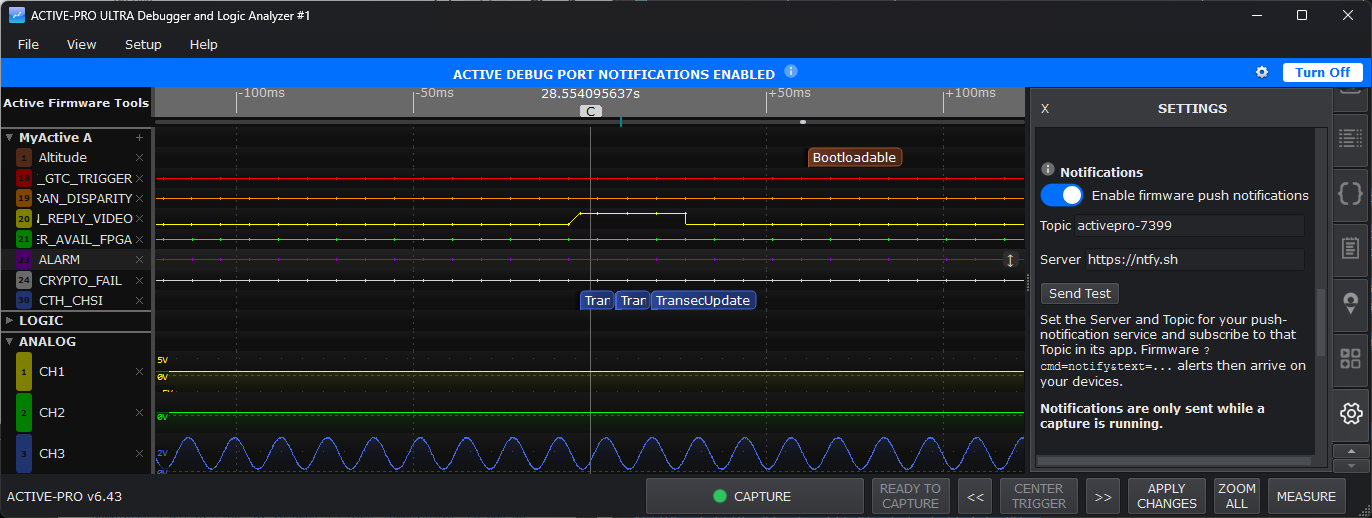
Notifications from firmware
Notifications let your firmware push an alert to your phone (or any other device you subscribe) while a capture is running. Instrument your code once, then walk away from a long or overnight test and get a message the instant the thing you are watching for actually happens, a fault trips, a state machine reaches a milestone, a value crosses a limit.
The alert is sent by your firmware, using a single Active Debug Port command, so you decide exactly when a notification fires and what it says. The application just relays it to the notification service you have configured.
Available on: all models (Active Debugger, Active-Pro, Active-Pro Ultra). Notifications ride on the Active Debug Port, so any pod that streams firmware debug output can send them.
How It Works
You pick a push-notification service and install its app on your phone (any service that accepts a simple web post will work; the app ships pre-filled with a common free default so you can be running in a minute).
In Settings > Notifications you set a Server and a Topic, then subscribe to that same Topic in the service's phone app.
Your firmware issues a notify command whenever it wants to alert you:
ACTIVEprintf(0, "?cmd=notify&text=Overcurrent trip on rail 3");While a capture is running, the application forwards the message to your Server and Topic, and it arrives on every device subscribed to that Topic.
That is the whole model: firmware decides when, you decide where.
Turning Notifications On
Open the Settings tab and find the Notifications section. It has:
| Control | What it does | |
|---|---|---|
| Enable firmware push notifications | Master on/off switch. Off by default. | |
| Topic | A private name you choose (for example active-pro-9f3k). Subscribe to this same name in your service's phone app. Pick something unguessable, anyone who knows your Server and Topic can post to it. |
|
| Server | The base web address of your push-notification service. A common free service is filled in by default; change it to whichever provider you prefer. | |
| Send Test | Sends a test notification right now so you can confirm your phone is subscribed correctly, before relying on it during a capture. |
When you switch Enable on, the application asks you to confirm, because turning it on opens a channel your connected firmware can use to message your devices. Only enable it for firmware you trust. Your Topic and Server are remembered between sessions (per pod).
The "Notifications Enabled" Banner
While notifications are enabled, a blue banner across the top of the window reads ACTIVE DEBUG PORT NOTIFICATIONS ENABLED. It is a deliberate, always-visible reminder that your firmware has a live channel to your phone. The banner has two controls:
- A gear button that jumps straight to the Notifications settings.
- A Turn Off button that disables notifications in one click.
The banner disappears as soon as notifications are turned off.
Important Behavior
- Only while capturing. Notifications are sent only while a capture is running. Nothing is sent when the application is idle. Press Capture to start receiving them.
- Firmware-driven only. The application never sends notifications on its own, no automatic "capture started" or "trigger fired" messages. Every notification comes from a
?cmd=notifycommand in your firmware, which keeps you in full control of the noise. - Rate limited. To protect you from a runaway firmware loop flooding your phone, notifications are gently rate limited. A short burst is delivered immediately; if firmware sends a flood, the extras are summarized rather than delivered one by one.
- Per pod. Each running pod has its own Notifications settings, so you can point different pods at different Topics.
Writing the Firmware Command
The command is an ordinary Active Debug Port text command, so it works from anywhere you can call ACTIVEText / ACTIVEprintf:
// Simple alert
ACTIVEprintf(0, "?cmd=notify&text=Test finished");

// With a runtime value
ACTIVEprintf(0, "?cmd=notify&text=Battery low: %d mV", millivolts);
The text after text= is what appears on your phone. See Active Debug Port for the full list of firmware control commands.
Typical Uses
- Overnight soak tests. Fire a notification when an error counter increments or a watchdog resets, and check your phone in the morning, or the moment it buzzes.
- Long stress runs. Alert on the first occurrence of a rare fault so you know to come back and inspect the capture.
- Milestones. Notify when a device finishes a boot sequence, completes a calibration, or reaches a target temperature, so you do not have to watch the screen.
Notifications are configured under Settings > Notifications and triggered by the firmware ?cmd=notify command. They are delivered only while a capture is running.