
Active Debug Port - Firmware Integration
Active Debug Port - Firmware Integration
Find the firmware source code you will include in your firmware/fpga projects on our GitHub site at:
https://github.com/activefirmwaretools/activefirmwaretools/tree/main/active-debug-port-source-code
Overview
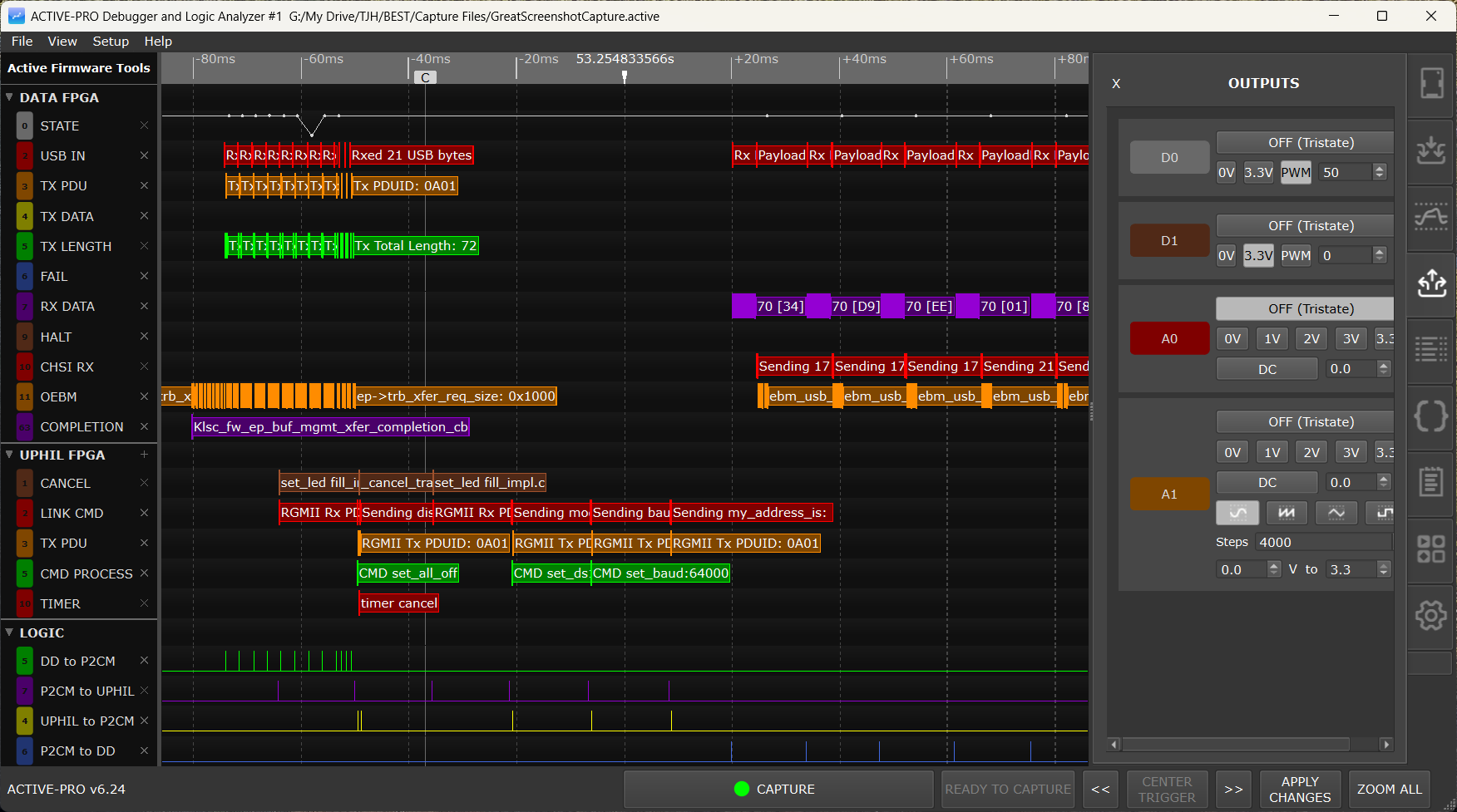
The Active Debuggers capture detailed debug information about the execution of firmware, including the graphed values of variables and the exact timings of debug messages as they are executed. The debug information is output from the microprocessors using the firmware routines (See the GitHub Repo) using a single line of code to create the Active Debug Port using standard GPIO pins (1 or 2 pins) or a standard SWV port. See the bottom of this page for the active.c and active.h files to include in your firmware projects.
No JTAG interface, no debugger stepping, no halting execution. Your firmware runs at full speed and streams live data to the PC in real time.
There are 2 types of data captured over the Active Debug Port: ACTIVE Text and ACTIVE Value (as well as the standard logic and analog inputs).
ACTIVE Text is character strings and are identical to traditional "printf" output. They are graphed over time as well as listed vertically.
Each debug text output is created by a simple source code line such as:
ACTIVEText( 2, "Button Pressed" );or
ACTIVEprintf( 2, "%d", accum );ACTIVE Value is value data that is then graphed versus time for a visual representation of the data.
Each data point on the waveform is created by a simple source code line such as:
ACTIVEValue ( 3, myvariable );The label on the left of each waveline can also be set from your firmware by calling the ACTIVELabel function.
You add a small library to your firmware project and call four functions:
| Function | What it does | |
|---|---|---|
ACTIVELabel(channel, name) |
Assigns a human-readable name to a channel number (0-63) | |
ACTIVEText(channel, string) |
Sends a text string on the specified channel | |
ACTIVEprintf(channel, format, ...) |
Sends a printf-formatted string on the specified channel | |
ACTIVEValue(channel, value) |
Sends a numeric value on the specified channel (displayed as a graph) |
Channel numbers are 0 through 63. Each Active Debug Port (A, B, C, D) has its own set of 64 channels.
Active Debug Port Protocol
The Active Debug Port Protocol is sent from an embedded processor to the ACTIVE Debugger Pod to transfer the information from the embedded system to the computer for capture and display.
The data is sent from the embedded processor to the ACTIVE Debugger Pod using the ACTIVE Debug Port, which is available in 3 versions: 1-wire, 2-wire, and SWV (Active-Pro only). Each version of the bus sends the same byte stream.
The 1-Wire ACTIVE Debug Port uses an ASYNC serial UART bus signaling with 8 data bits and no parity at any baud rate that is an exact divide down of 30MHz. Bit alignment is defined by the UART start bit protocol.
The 2-Wire ACTIVE Debug Port uses a SYNC serial bus signaling (CLOCK and DATA lines) with 8 data bits with DATA sampled on the rising edge of the CLOCK rate up to 80M bits per second. This mode can be created easily using an SPI bus using just the SCK and MOSI signals. The bit alignment is determined by the fact that every MSBit is a 0. To sync, the decoder detects if the MSBit is a 1, and if it is, skips a bit until it is never a 1. Once synced, it will remain synced until the 0x7F no longer exists or an MSBit is a 1, at which point a new sync procedure will be completed.
On the Active-Pro, the SWV ACTIVE Debug Port uses the UART encoding mode of SWV (Manchester is not supported) with serial UART bus signaling with 8 data bits and no parity at any baud rate that is an exact divide down of 30MHz. Bit alignment is defined by the UART start bit protocol. SWV outputs 2 bytes for each transmitted character: the first byte is the SWV channel and type indicator, and the second byte is the actual channel data. The Active Debug Port data is contained in these second bytes and the first bytes are ignored.
Byte Framing Rule
Every byte that carries Active Debug Port data has its most-significant bit (bit 7) cleared to 0. The byte 0x7F (binary 01111111) is reserved as the packet sync byte and is the only legal start-of-packet byte. Every packet begins with 0x7F, and the byte immediately following 0x7F is always a Channel/Type byte that selects between Text and Value, and selects channel 0 through 63.
The MSBit=0 rule is what lets a 2-wire SPI receiver lock onto byte boundaries with no external framing. The receiver hunts a bit-alignment in which every received byte has its top bit clear. Once that alignment holds, byte framing is locked. If the receiver later sees a byte with bit 7 set, it knows alignment has been lost and hunts again.
Packet Structure
Every packet has 3 sections, sent in order:
- Sync byte = 0x7F
- Channel/Type byte that selects packet type and channel number
- Payload whose format depends on packet type
The Channel/Type byte uses this bit layout:
bit 7      bit 6              bits 5..0
  +-------+--------------+----------------------------+
  |   0   |  Type        |   Channel  (0 .. 63)       |
  +-------+--------------+----------------------------+
                |
                +---- 0 = Value packet
                      1 = Text packet
So:
0x00..0x3F(bit 6 = 0): Value packet, channel = (byte) & 0x3F0x40..0x7F(bit 6 = 1): Text packet, channel = (byte) & 0x3F
Active Text Packet
A Text packet carries an ASCII string. After the sync and Channel/Type bytes, the payload is the string body, each character ANDed with 0x7F (top bit cleared so the framing rule holds), followed by a single 0x00 terminator byte.
Byte layout:
0x7F   |   0x40 | (channel & 0x3F)   |   char1 & 0x7F   |   char2 & 0x7F   |   ...   |   charN & 0x7F   |   0x00
   ^                       ^                                                                                 ^
   sync             channel/type=Text                                                                  NUL terminator
Minimum length: 4 bytes (sync, channel, one char, NUL). Maximum length is bounded by the firmware's transmit buffer (the reference C library caps it at MAX_ACTIVE_LENGTH = 255 bytes total).
Worked example: ACTIVEText(0, "Hi")
0x7F   0x40   0x48   0x69   0x00
   |      |      |      |      |
   |      |      |      |      +-- NUL terminator
   |      |      |      +--------- 'i'  (0x69)
   |      |      +---------------- 'H'  (0x48)
   |      +------------------------ Text packet, channel 0   (0x40 = bit6=1 | ch 0)
   +------------------------------- Sync
5 bytes total.
Worked example: ACTIVEText(5, "OK")
0x7F 0x45 0x4F 0x4B 0x00Channel/Type byte 0x45 = bit 6 (Text) | channel 5.
Worked example: ACTIVEText(63, "x")
0x7F 0x7F 0x78 0x00Both the sync byte and the Channel/Type byte are 0x7F here, because channel 63 with Text type encodes as 0x40 | 0x3F = 0x7F. The decoder, knowing it has just consumed a sync and is therefore expecting a Channel/Type byte, treats the second 0x7F as the channel byte, not as a new sync.
Worked example: ACTIVELabel(3, "Motor")
ACTIVELabel(channel, string) is a macro that expands to ACTIVEText(channel, "?cmd=label&label=" string). So ACTIVELabel(3, "Motor") transmits the same bytes as ACTIVEText(3, "?cmd=label&label=Motor"):
0x7F   0x43   0x3F 0x63 0x6D 0x64 0x3D   0x6C 0x61 0x62 0x65 0x6C   0x26   0x6C 0x61 0x62 0x65 0x6C 0x3D   0x4D 0x6F 0x74 0x6F 0x72   0x00
   ^      ^       ?    c    m    d    =      l    a    b    e    l     &      l    a    b    e    l    =     M    o    t    o    r
   sync   ch=3,
          Text
The host recognizes the ?cmd=label&label=Motor body as a control command (not displayable text) and assigns "Motor" as the channel-3 label instead of showing the string in the waveform. Other ?cmd=... control commands (beep, stop, restart, zoomall, email, notify, LiveUI widget assignments) ride on this same text-packet format. See the Control Commands section below.
Active Value Packet
A Value packet carries a signed integer. After the sync and Channel/Type bytes, the payload is a variable-length chain of 6-bit chunks, least-significant chunk first.
Each chunk byte uses this bit layout:
bit 7   bit 6                  bits 5..0
  +------+-----------------------+------------------------+
  |  0   |  0 = more chunks      |    6 data bits         |
  |      |  1 = last chunk       |                        |
  +------+-----------------------+------------------------+
Encoding rule used by the firmware:
- If
valuestill has more than 6 bits of magnitude (positivevalue>= 32, or negativevalue< -32), emitvalue & 0x3Fas an intermediate chunk (bit 6 = 0), then arithmetically shiftvalueright by 6 bits and repeat. - Otherwise, emit
(value & 0x3F) | 0x40as the last chunk (bit 6 = 1) and stop.
Decoding rule:
- Read chunk bytes until you see one with bit 6 = 1.
- The last chunk's lower 6 bits are interpreted as a signed 6-bit value (bit 5 of that chunk is the sign bit) and the result is sign-extended past it.
- All earlier chunks contribute their 6 data bits unsigned at successively higher bit positions (chunk index 0 at bits 0..5, chunk index 1 at bits 6..11, chunk index 2 at bits 12..17, and so on).
Byte layout:
0x7F   |   (channel & 0x3F)   |   chunk0   |   chunk1   |   ...   |   chunkN_last
   ^             ^                                                          ^
   sync   channel/type=Value                                       bit 6 = 1 marks end
The number of chunks varies with the magnitude of the value:
| Value range | Chunks | Total packet bytes | ||
|---|---|---|---|---|
| -32 to 31 | 1 | 3 | ||
| -2,048 to 2,047 | 2 | 4 | ||
| -131,072 to 131,071 | 3 | 5 | ||
| -8,388,608 to 8,388,607 | 4 | 6 | ||
| -536,870,912 to 536,870,911 | 5 | 7 | ||
| full signed 32-bit range | 6 | 8 |
Worked example: ACTIVEValue(0, 0)
0x7F   0x00   0x40
   |      |      |
   |      |      +-- Last chunk: bit 6 = 1, data bits = 000000 (positive, value 0)
   |      +--------- Value packet, channel 0
   +---------------- Sync
3 bytes total. Decode: 1 chunk, signed 6-bit value 0.
Worked example: ACTIVEValue(0, 1)
0x7F 0x00 0x41Decode: 1 chunk, last, data bits 000001 = +1.
Worked example: ACTIVEValue(0, 31) (maximum value in 1 chunk)
0x7F 0x00 0x5FLast chunk bits 011111 = +31.
Worked example: ACTIVEValue(0, -1)
0x7F 0x00 0x7FLast chunk bits 111111. Bit 5 (the sign bit) is set, so it sign-extends to -1. Note the last byte is itself 0x7F; the decoder consumes it as the terminating chunk because bit 6 = 1, not as a new sync.
Worked example: ACTIVEValue(0, -32) (minimum value in 1 chunk)
0x7F 0x00 0x60Last chunk bits 100000. Sign bit set, lower 5 bits zero, sign-extends to -32.
Worked example: ACTIVEValue(0, 32) (first value that needs 2 chunks)
0x7F   0x00   0x20   0x40
   |      |      |      |
   |      |      |      +-- Last chunk: bits 000000, positive sign extension
   |      |      +--------- Intermediate chunk: bits 100000 = 32 at bit position 0
   |      +---------------- Value packet, channel 0
   +---------------------- Sync
Decode: chunk0 = 32 at position 0, chunk1 (last) = 0 at position 6, signed. Result = 0 + 32 = 32.
Worked example: ACTIVEValue(0, 100)
0x7F 0x00 0x24 0x41Chunk0 = 0x24 = 36 at position 0. Chunk1 (last) = 0x41, data bits 000001 = +1 at position 6, contributing 64. Result = 64 + 36 = 100.
Worked example: ACTIVEValue(0, -100)
0x7F 0x00 0x1C 0x7EChunk0 = 0x1C = 28 at position 0. Chunk1 (last) = 0x7E, data bits 111110, sign bit set, sign-extends to -2 at position 6, contributing -128. Result = -128 + 28 = -100.
Worked example: ACTIVEValue(0, 1000)
0x7F 0x00 0x28 0x4FChunk0 = 0x28 = 40 at position 0. Chunk1 (last) = 0x4F, data bits 001111 = +15 at position 6, contributing 960. Result = 960 + 40 = 1000.
Worked example: ACTIVEValue(0, 74565) (3-chunk packet, value = 0x12345)
0x7F 0x00 0x05 0x0D 0x52Chunk0 = 5 at position 0. Chunk1 = 0x0D = 13 at position 6, contributing 832. Chunk2 (last) = 0x52, data bits 010010 = +18 at position 12, contributing 73,728. Result = 73,728 + 832 + 5 = 74,565.
Worked example: ACTIVEValue(31, -1000) (mid-range channel, negative, 2 chunks)
0x7F 0x1F 0x18 0x70Channel/Type byte 0x1F = bit 6 (Value, 0) | channel 31. Chunk0 = 0x18 = 24 at position 0. Chunk1 (last) = 0x70, data bits 110000, sign bit set, sign-extends to -16 at position 6, contributing -1024. Result = -1024 + 24 = -1000.
Multiple Packets Back-to-Back
Packets are concatenated directly with no inter-packet idle byte required. The next 0x7F encountered after a complete packet always starts a new one. For example, ACTIVEValue(0, -1) followed by ACTIVEValue(0, 1) transmits:
0x7F 0x00 0x7F     0x7F 0x00 0x41
  \____packet 1___/  \____packet 2___/
The decoder consumes the first three bytes as packet 1 (sync, channel, last-chunk = -1), then the next 0x7F as the sync of packet 2.
Resynchronization
Because every payload byte has bit 7 = 0, the receiver can always detect a misaligned bit-clock: if any received byte has bit 7 = 1, the byte boundary is wrong. The 2-wire receiver slips one bit and retries until every byte received has bit 7 = 0 again. Once locked, the receiver scans for 0x7F to find packet starts. Intermediate value chunks (bit 6 = 0) are restricted to the range 0x00..0x3F and can therefore never collide with the 0x7F sync pattern; only the final chunk of a value packet (bit 6 = 1) or a text-payload character can equal 0x7F, and in both cases the decoder is already in a state that knows to consume that byte as data rather than treat it as a sync.
Supported Platforms
The Active Debug Port library is available for:
- C and C++ (any embedded platform with GPIO or SPI/UART)
- Verilog / SystemVerilog (FPGA)
- VHDL (FPGA)
- Python (MicroPython and similar)
Download the library for your platform from activefirmwaretools.com.
Connection Modes
2-Wire Synchronous Mode (Recommended)
Uses two GPIO pins: one for clock, one for data. This is the highest throughput mode.
If your microcontroller has an SPI peripheral, you can use it for the 2-wire output, configure SPI in transmit-only mode (MOSI + SCK). This offloads the bit-banging to dedicated hardware and maximizes throughput while minimizing firmware overhead.
When to use: When maximum throughput is needed and two GPIO pins are available.
1-Wire UART Mode
Uses one GPIO pin (your MCU's UART TX output). The baud rate must be an exact divisor of 30 MHz (for example: 1 Mbaud, 500 kbaud, 250 kbaud, 115200 baud, etc.). If your MCU has a UART peripheral, it drives this pin automatically.
When to use: When only one GPIO pin is available, or when you want to reuse an existing UART TX pin. Good for MCUs where SPI is not available.
1-Wire SWV (ARM Cortex-M)
Uses the dedicated SWV/ITM debug output pin on ARM Cortex-M processors. No additional GPIO pins required. The microcontroller's built-in ITM hardware sends the data.
When to use: On ARM Cortex-M targets where the SWV pin is accessible and all other GPIO pins are in use.
Sending Text Output
// Label the channels (do this once during initialization)
ACTIVELabel(0, "System");
ACTIVELabel(1, "Motor");
ACTIVELabel(2, "Comms");

// Send text during normal operation
ACTIVEText(0, "Init complete");
ACTIVEText(1, "Motor: starting");

// Send formatted strings like printf
ACTIVEprintf(0, "Temp = %d degrees", temperature);
ACTIVEprintf(2, "RX packet len=%d seq=%d", len, seq);
Each call produces one timestamped text event in the waveform display. The event appears on the channel's waveform row and in the List tab at the exact time it was transmitted.
Tip: Use
ACTIVELabel()at startup to name your channels. If you skip this, channels appear as numbers (Ch0, Ch1, etc.) instead of meaningful names.
Sending Numeric Values
// Send a value that will appear as a graph waveform
ACTIVEValue(3, motor_speed_rpm);
ACTIVEValue(4, temperature_celsius);
ACTIVEValue(5, battery_voltage_mv);
Calls to ACTIVEValue() produce a continuously updated line graph in the waveform display. Each call adds one data point to the graph at the time the call occurred. The result looks like an oscilloscope trace of your variable's value over time, but derived entirely from your firmware, not from hardware probing.
Call ACTIVEValue() regularly (for example, every control loop iteration) to get a smooth graph. Call it only when a value changes if you want a step-function graph.
Trigger on ACTIVE Values: Once your firmware is graphing a value, you can trigger the capture on that value using Source = Device X Values in the Buffer & Triggers tab. Conditions: rising/falling/equals/does-not-equal a configured integer threshold.
How Much Data Can the Active Debug Port Handle?
This depends on the connection mode and your MCU's clock:
- 2-wire SPI: Very fast, your SPI peripheral's maximum speed, typically several MHz. At 4 MHz SPI clock, you can send millions of bytes per second, which corresponds to thousands of
ACTIVEprintfcalls per second. - 1-wire UART at 1 Mbaud: Approximately 100,000 bytes per second.
- 1-wire UART at 115200 baud: Approximately 11,500 bytes per second.
Each ACTIVEText or ACTIVEprintf call sends the string length plus a small framing overhead. Short, frequent messages are more efficient than long, infrequent ones.
Practical guidance:
- Do not call ACTIVEprintf inside interrupt service routines unless you are using the SPI peripheral mode and the call is non-blocking.
- Use
ACTIVEValue()instead ofACTIVEprintf()for numeric data that changes every loop, it transmits a 4-byte frame versus a full formatted string. - Disable logic channels you are not using in the Inputs tab to reduce USB bandwidth consumption and leave more headroom for Active Debug Port data.
Best Practices
Until we can get an Active Debug Port Hardware Block built inside every microprocessor, use the following Best Practices while using these critical new debug ports on any of your microprocessors:
Debug Output Speed - Since each call to the debug output takes a small amount of time away from the host processor, it is important to use the fastest method of transfer possible. The fastest mode is 2-wire mode, and if you have a built-in SPI hardware block in your MCU even better. The slowest mode is typically the 1-wire mode since it is typically driven by a UART. In this case, use as fast a baud rate as possible.
Volume of Debug Messages - To minimize the impact on your host processor and to minimize the capture file size, try to have debug messages only when needed, and make them as brief as possible while not losing the context of the message.
Turn Off Digital Signals - Although you can capture the digital signals that make up the Active Debug Port, it is not necessary, and if enabled will consume far more data bandwidth than with them off. Turn off the Digital Input channels for your Active Debug Ports (and any other hardware decoded buses as well).
Where is the First Debug Output Message? - There is auto signal detection that automatically determines which signal is clock and which is data. This process takes a whole byte to determine, so it has a 50% chance of misinterpreting the first byte. To solve this, and capture the very first message, either send the message again, or swap the wires to get the very first message. Once the Active-Pro determines the correct signal setup (clock and data detection), it will be correct for future captures.
Using these methods, you can have a powerful debug port into your microprocessor with minimal impact on your application firmware. Representative timing: ACTIVEValue(25, 89815) using 2-wire mode with a 33MHz SPI hardware block consumes 1.75 µsec; ACTIVEText(24, "Hello") in the same configuration consumes 2.88 µsec.
Using Multiple Active Debug Ports
On the Active-Pro and Active-Pro Ultra, four Active Debug Ports (A, B, C, D) can be connected to four separate processors or FPGAs simultaneously, all captured on the same timeline.
Each pod port connects to the appropriate input leads for that port. In the Inputs tab, configure each port with the decoder mode matching its connected firmware. The resulting waveform shows all four devices' debug output interleaved on the same time axis.
Common use cases:
- Master and slave MCUs in a multi-processor system
- FPGA logic output alongside ARM firmware output
- Two boards running the same firmware, compared side by side on the same timeline
Instrumentation Strategy
The key to effective Active Debug Port use is strategic instrumentation, not exhaustive instrumentation. Instrument at the points that give you the most information about what is happening.
Good instrumentation targets:
- State machine transitions:
ACTIVEprintf(0, "State: IDLE -> ACTIVE")at every state change - Error conditions:
ACTIVEText(1, "ERROR: timeout")immediately when detected - Key variable values at key moments:
ACTIVEprintf(2, "PID: err=%d out=%d", error, output)once per control loop - Interrupt/callback entry and exit for timing analysis: use
ACTIVEValue(3, 1)on entry andACTIVEValue(3, 0)on exit to graph ISR activity over time - Bus transactions: note that hardware bus decoders (I2C, SPI, UART) already capture bus traffic on the same timeline, you do not need to log bus bytes through the Active Debug Port
Avoid:
- Logging every iteration of a tight loop that runs at MHz speeds (generates more data than the port can transmit)
- Logging within time-critical sections where even microseconds of overhead matter (use
ACTIVEValue()which has minimal overhead, or move the logging to after the critical section)
Firmware Routines
The Active-Pro™ captures the debug data from your firmware when you call the following routines.
ACTIVEText(unsigned char channel, unsigned char *string)
This routine outputs the given text on the channel specified.
channel= 0 through 63stringis the null-terminated string to output. These can also be special Control Commands (see below) to control various features of the host capture software.
Example: ACTIVEText(2, "It Happened!"); - Displays "It Happened!" on channel 2 at the current time
ACTIVEprintf(unsigned char channel, unsigned char *printfformatstring, ...)
This routine outputs the printf-like text on the channel specified.
channel= 0 through 63printfformatstringis the null-terminated string to use as in the standard C printf routine...are the parameters used by the format string
Example: ACTIVEprintf(4, "%d: %d", index, data); - Displays "23: 15432" on channel 4 if index = 23 and data = 15432
ACTIVEValue(unsigned char channel, signed long value)
This routine outputs the given value on the channel specified to be graphed over time.
channel= 0 through 63valueis a signed long and can range from -2,147,483,648 to 2,147,483,647
Example: ACTIVEValue(2, ADCValue); - Adds a graphed point at the value 123 on channel 2 at the current time if ADCValue = 123
ACTIVELabel(unsigned char channel, unsigned char *string)
This routine sets the label for the channel specified.
channel= 0 through 63stringis the null-terminated string that becomes the new channel label
Example: ACTIVELabel(2, "State"); - Changes the channel 2 label to "State"
Control Commands
Your firmware does not only send data to the Active-Pro™, it can also drive it. Any string you pass to ACTIVEText() or ACTIVEprintf() that begins with ?cmd= is treated as a command rather than as debug text. The application acts on it and, by default, keeps it off the waveform.
?cmd=<command>[&<parameter>=<value>]...The whole string is parsed the same way a URL query string is, so parameter values are percent-decoded (%26 for a literal &, %20 for a space). The command name and parameter names are case-insensitive; parameter values that are shown to you, such as label and notify text, keep the capitalization you sent.
This is the complete set of control commands:
| Command | What it does | |
|---|---|---|
?cmd=beep |
Plays an audible beep on the computer | |
?cmd=stop |
Stops the capture in progress | |
?cmd=restart |
Stops the capture and immediately starts a new one, discarding the old trace | |
?cmd=zoomall |
Zooms the waveform display to show all captured data | |
?cmd=label&label=<text> |
Names the channel the string was sent on | |
?cmd=led&color=<color>[&blink=<ms>] |
Sets the color and blink rate of the physical RGB LED on the pod | |
?cmd=notify&text=<text> |
Sends a push notification to your phone and other subscribed devices | |
?cmd=<widget>&color=<color> |
Turns the channel into a Live UI widget (gauge, progress bar, battery, text label, indicator LED) | |
?cmd=api&exec=<command line> |
Runs any Automation API command |
Play Beep: ACTIVEText(channel, "?cmd=beep") - generates an audible BEEP on the computer.
Stop Capture: ACTIVEText(channel, "?cmd=stop") - stops the capture in progress and displays the trace that has been stored.
Restart Capture: ACTIVEText(channel, "?cmd=restart") - stops and restarts the capture, discarding the previous trace.
Zoom All: ACTIVEText(channel, "?cmd=zoomall") - zooms the waveform display to show all captured data.
Channel Label: ACTIVEText(channel, "?cmd=label&label=Motor RPM") - names the channel the command arrives on, so your trace is labelled by the firmware itself instead of by hand in the Inputs tab. This is the same thing ACTIVELabel() does; the command form is there for firmware that only has ACTIVEText() available. Send it once during start-up for each channel you use.
Physical LED: ACTIVEText(channel, "?cmd=led&color=red&blink=500") - sets the color, and optionally the blink interval in milliseconds, of the RGB LED on the front of the pod. Accepted colors are red, orange, yellow, green, blue, cyan, magenta, white and black. Omit blink for a solid color. This is the pod's own LED, not a screen widget, and the channel number is irrelevant. It gives you an across-the-room indication of what your firmware is doing while a long test runs.
Push Notification: ACTIVEprintf(channel, "?cmd=notify&text=your message") - sends a push notification to your phone or other subscribed devices. Notifications must be enabled and configured under Settings > Notifications, and are only delivered while a capture is running. This lets your firmware alert you the moment something happens during a long, unattended test. See Notifications for setup and details.
Live UI Widgets: ACTIVEText(channel, "?cmd=gauge1&color=blue") - turns the channel into an on-screen widget, a gauge, progress bar, battery indicator, text label or indicator LED, that updates live from your subsequent ACTIVEValue() and ACTIVEText() calls on that channel. See Live UI Dashboard for the full list of widget types and colors.
Run an Automation API Command: ACTIVEText(channel, "?cmd=api&exec=command") - runs any command from the Automation API, letting your firmware drive the application the same way an automation script does. See Any Automation API Command below.
Any ?cmd= string that is not one of the commands above is ignored. It is neither acted on nor, by default, shown on the waveform, so an unrecognized or misspelled command fails silently. If a command appears to do nothing, turn on Show firmware ?cmd... commands on the waveform (described at the end of this chapter) to confirm what your firmware actually sent.
Any Automation API Command
The commands above cover the handful of things firmware asks for most often. When you need something else, ?cmd=api gives your firmware the entire Automation API, the same command set a Python or C# test script drives over the TCP socket:
?cmd=api&exec=<command line>Everything after &exec= is the command line, exactly as you would send it over the socket. Spaces need no encoding, so you can write the command out plainly:
/* Drive the A1 signal generator as a 0.5 - 2.5 V sine wave */
ACTIVEText(0, "?cmd=api&exec=SetA1Mode 8");
ACTIVEText(0, "?cmd=api&exec=SetA1Minimum 0.5");
ACTIVEText(0, "?cmd=api&exec=SetA1Maximum 2.5");
ACTIVEText(0, "?cmd=api&exec=SetA1Steps 250");

/* Put A0 at a custom DC level and D0 at 50% PWM */
ACTIVEText(0, "?cmd=api&exec=SetA0Mode 6");
ACTIVEText(0, "?cmd=api&exec=SetA0DCLevel 2.5");
ACTIVEText(0, "?cmd=api&exec=SetD0Mode 3");
ACTIVEText(0, "?cmd=api&exec=SetD0PWM 128");
ACTIVEprintf() works too, which is how you build a command out of live firmware state:
ACTIVEprintf(0, "?cmd=api&exec=SetA0DCLevel %d.%02d", volts, hundredths);
ACTIVEprintf(0, "?cmd=api&exec=AppendNote motor stalled at %d RPM", rpm);
This turns your target into the test controller. A power-supply sweep, a stimulus ramp fed back into your own ADC, a note written into the capture at the exact moment a fault trips, all driven from the firmware itself with no host script running.
Rules
- One command per string, and
execmust come last. Everything after&exec=is taken as the command, right to the end of the string, so nothing in your parameters can be mistaken for another field. - Percent escapes still work. Send
%26if a parameter needs a literal&, and%20for a space you need preserved at the very end of the line. - Keep it under 255 characters. That is the limit for any Active Debug Port string, leaving roughly 240 characters for the command itself.
- Commands run only while a capture is running. They are ignored when a
.activefile is opened, so loading a saved capture never replays your firmware's commands and rewrites your settings, outputs, or view.StartCapturefrom firmware is therefore meaningless, a capture has to already be running for the command to reach the application at all. - Your firmware cannot read the reply. The Active Debug Port only runs target to host, so there is no return path. Responses, including the results of
Get...commands, are discarded. Your firmware is issuing commands blind. - Commands run in the order you send them, a fraction of a second after they arrive. Up to 256 can be waiting at once; past that, further commands are dropped until the backlog clears, so a runaway loop cannot swamp the application.
See the Automation API chapter for the full command list.
Seeing your commands on the waveform
Command strings are hidden from the waveform by default, they are control traffic rather than debug output, and showing them would clutter the trace. While you are debugging the commands themselves it is useful to see exactly what your firmware sent and when. Turn on Show firmware ?cmd... commands on the waveform under Settings > Active Debug Port Commands and every ?cmd... string appears on its channel like ordinary ACTIVEText() output.
The switch is remembered between sessions and is not stored in .active files. It applies to the next capture, and to the next time you open a .active file, it does not change a trace that is already on screen.
Embedded Firmware Source Code
Find the firmware source code on our GitHub site at:
https://github.com/activefirmwaretools/activefirmwaretools/tree/main/active-debug-port-source-code
A key component to the Active-Pro™ system is the firmware that runs on your embedded microcontroller. The microcontroller sends debug information out a pair of general purpose I/O lines (GPIO) whenever you want to see a state, location or variable of your code in real-time operation. To send out this data you call one of the API routines.
The firmware source code is embedded in your firmware project and provides simple API routines that can be called any time your firmware wants to output information. Similar to printf(...), you can quickly add single lines of code to output a new set of information at exactly the correct time.
To use this firmware source code, copy the source into your project (either inline or in a new source file). Then modify the contents between the MAKE YOUR CHANGES comments. These modifications define how to set the output level of the two GPIO signals as well as other platform-specific settings. See the source code comments for more details.