
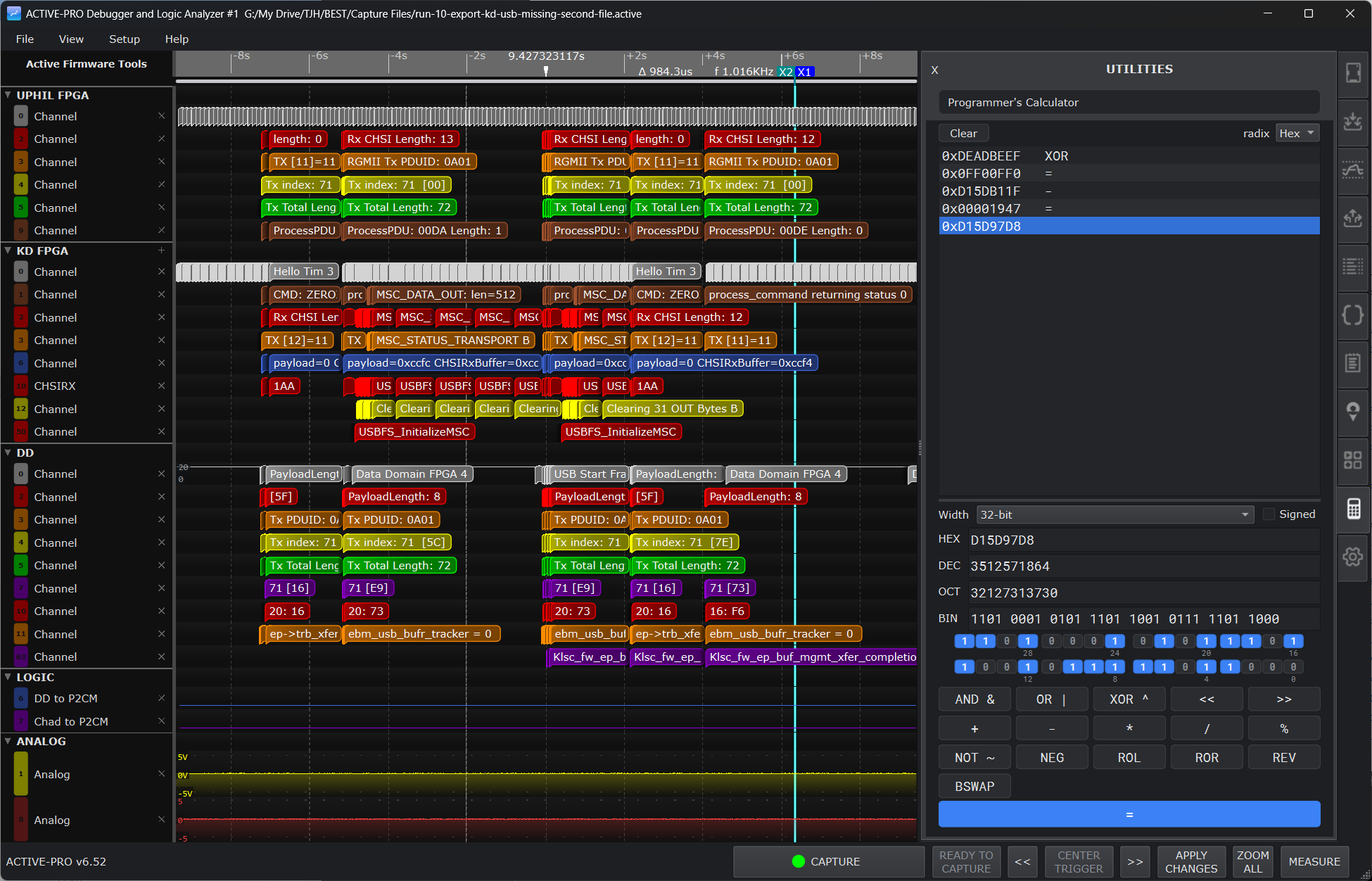
Utilities Tab
The Utilities tab is a built-in set of everyday engineering tools, the small calculations and lookups you reach for constantly while writing firmware and debugging a bus. Instead of switching to a separate calculator app or a web page, they live right inside the Active-Pro software, themed to match the rest of the application and always a click away.
The Utilities tab is available on all three hardware models, and it works whether or not a pod is connected. You can use it as a standalone toolbox even with no capture open.
Opening the Utilities Tab
There are three ways to open it:
- Click the calculator icon in the right-side tab bar.
- Press the A key over the waveform area.
- Right-click any waveform row and choose ASCII Table.
All three open the same tab. The X button at the top left of the panel collapses it back to the tab bar, exactly like the other side panels.
Switching Between Tools
A selector at the top of the tab lists every tool. Pick one from the drop-down and the panel below switches to it with a short fade. The tools appear in this order:
- Programmer's Calculator
- ASCII Table
- CRC Calculator
- Base Converter
- IEEE-754 Inspector
- Q-Format Fixed-Point
- Two's Complement
- Endian / Bit Reverse
- Baud Rate Solver
- Timer / Prescaler Solver
- ns to Clock Cycles
- I2C Address Directory
- ANSI / Control Codes
- Base64 / C-String
- Code Helpers
Every tool recomputes live as you type, so there is no "calculate" button to press unless noted. Result boxes and readouts are selectable, so you can copy any value straight out of the panel. The panel reflows to whatever width you give it, so you can keep it narrow beside a wide waveform or open it up for more room.
Programmer's Calculator
A full bitwise and arithmetic calculator that works on one machine word at a time and keeps a running tape of your steps.
- Choose the word width: 8, 16, 32 (default), or 64 bits. The Signed checkbox interprets the decimal readout, and signed shift, divide, and modulo, as two's complement.
- Type an operand in any of the four fields, HEX, DEC, OCT, or BIN, and the other three update to match. The fields accept
0x,0o, and0bprefixes. A clickable bit map below the fields shows every bit (most significant at the top left, grouped by nibble and byte); click a bit to toggle it. - Enter a value, press an operator, enter the next value, and press =. Operators include the binary operations
AND &,OR |,XOR ^,<<, data-preserve-html-node="true">>,+,-,*,/,%, and the unary operationsNOT ~,NEG,ROL,ROR,REV(bit reverse), andBSWAP(byte swap). The matching keyboard keys work too. - The tape at the top records each step. Set how the tape shows values with the radix drop-down (Hex, Dec, Oct, Bin). Click any tape line to copy that value and drop it back into the operand fields for reuse. Clear empties the tape.
ASCII Table
An interactive, searchable character reference.
- A reflowing grid lists every code with its decimal value, hex value, and either its control mnemonic or the printed glyph, color-coded by category (whitespace, control, digit, uppercase, lowercase, Latin-1, symbol).
- The ASCII and Latin-1 buttons switch between codes 0 to 127 and 128 to 255.
- The Search box filters and jumps by decimal, hex (with or without
0x), character name, mnemonic, category, or the literal character. - Click any cell to select it. The inspector footer then shows that character's name and a row of click-to-copy pills: CHR (the character), DEC, HEX, ESC (
\xHH), BIN, U+ (Unicode code point), and ENT (HTML entity), plus caret notation and C escapes where they apply.
CRC Calculator
Computes a CRC over bytes you enter, using any of a large catalog of standard algorithms or your own custom parameters.
- Enter the data in the Input bytes (hex) box (spaces, commas, and
0xare ignored). A live byte count is shown. The default sample is the bytes for the string "123456789". - Pick a standard from the Model drop-down. The list runs from
Customthrough the full catalog by width: CRC-3, CRC-4, CRC-5, CRC-7, the CRC-8 family (AUTOSAR, MAXIM-DOW, SMBUS, and more), CRC-15/CAN, the CRC-16 family (ARC, CCITT/XMODEM, MODBUS, KERMIT, IBM-SDLC, USB, and more), CRC-24, the CRC-32 family (ISO-HDLC, BZIP2, ISCSI, MPEG-2, CKSUM, JAMCRC, and more), CRC-40/GSM, and CRC-64. The default is CRC-32/ISO-HDLC. - To roll your own, edit Width, Polynomial, Initial, XOR out, and the Reflect input bytes and Reflect output CRC checkboxes. Editing any parameter switches the Model to Custom.
- The result appears as a large hex value, along with a
Check ("123456789") = 0x...line with a check mark or the expected value, so you can confirm the algorithm matches a known reference.
Base Converter
Converts one unsigned integer among four bases at once, and can split it into bit-fields.
- Choose a width (8, 16, 32, or 64 bits). Type into any of the Hex, Decimal, Octal, or Binary fields and the others update live. The default value is
0xDEADBEEF. - The bit-field split box takes comma-separated
hi:loranges (or single bit numbers), for example31:16, 15:0. Each range produces a row showing the extracted field in hex, decimal, and grouped binary. An out-of-range entry shows an inline error.
IEEE-754 Inspector
Decodes and encodes floating-point numbers and shows the sign, exponent, and mantissa breakdown.
- Choose the format: Half (16-bit), Single (32-bit, default), or Double (64-bit).
- Enter a Decimal value (including
inf,-inf, ornan) or the raw Hex bits; the two stay in sync. - A colored bit strip shows each bit, with the sign, exponent, and mantissa fields tinted differently. Below it, rows list the raw and unbiased exponent, the raw mantissa, and the classification (Normal, Subnormal, Zero, Infinity, or NaN, with sign).
Q-Format Fixed-Point
Converts between real values and fixed-point Q-format raw integers and reports the format's resolution, range, and quantization error.
- Set the Integer bits (m) and Fractional bits (n), and the Signed (two's complement) checkbox. A summary line reads, for example,
Q1.15 - 16 bits total. - Type into the Real value, Raw (decimal), or Raw (hex) field and the others follow.
- The tool reports the dequantized value, the resolution (2^-n), the representable range, and the quantization error for the value you entered.
Two's Complement
Interprets a value at a chosen bit width as a signed two's-complement number and shows related forms, including sign-extension.
- Enter a Value (signed decimal, or hex with
0x) and a Width (bits). - The tool shows the signed decimal result plus its binary, hex, unsigned, and negation forms.
- A sign-extend section widens the value to a Target width you choose and shows the hex and binary of the sign-extended result.
Endian / Bit Reverse
Takes a hex value and shows several byte and bit reordering transforms side by side.
- Enter a Value (hex) and pick a width (16, 32, or 64 bits).
- The tool shows the Original, Byte-swapped, Bit-reversed (whole word), and Per-byte bit-rev (each byte's bits reversed in place) results, each as both a packed hex value and a spaced big-endian byte sequence.
Baud Rate Solver
Finds the UART divisor for a target baud rate given a peripheral clock and oversampling factor, and reports the resulting error.
- Enter the Clock (with a Hz / kHz / MHz unit), the Target baud, and the Oversampling factor (8 or 16).
- The tool reports the ideal divisor, the chosen (integer) divisor in decimal and hex, the actual baud rate, and the error percentage, color-coded so you can see at a glance whether it is within tolerance.
- A reference table lists the divisor and error for common baud rates from 300 up to 921600 at your chosen clock.
Timer / Prescaler Solver
Searches prescaler (PSC) and reload (ARR) values that best hit a target period or frequency for an STM32-style timer, using period = (PSC+1) x (ARR+1) / f_clk.
- Enter the Timer clock (with a Hz / kHz / MHz unit), the Target (as a period in s, ms, us, or ns, or as a frequency in Hz), and the Counter width (16-bit or 32-bit).
- The tool reports the best PSC and ARR, the actual period and frequency they produce, and the error percentage. If nothing fits, it tells you the target is out of range.
ns to Clock Cycles
Converts between elapsed time and clock cycles for a given clock, in both directions.
- Enter the Clock (with a Hz / kHz / MHz unit), then a Time (ns, us, ms, or s) or a Cycles count. Editing one updates the other.
- The tool also shows the clock period (in ns and MHz) and the exact fractional result.
I2C Address Directory
A searchable, curated table of 7-bit I2C addresses and the common parts found at each.
- The Filter box matches a hex address (for example
68or0x3C) or device-name text. - Columns show the 7-bit address, the Write byte (
addr<<1), data-preserve-html-node="true" the Read byte ((addr<<1)|1), data-preserve-html-node="true" and the Device / Notes. Reserved ranges (general call, Hs-mode, 10-bit) are flagged, and popular sensors, EEPROMs, GPIO expanders, and displays are listed. - Select a row to see a large
0xNN W:0xNN R:0xNNreadout.
ANSI / Control Codes
A categorized, searchable reference of ANSI escape sequences and C0 control characters.
- The category drop-down selects SGR (colors and styles), Cursor movement, Erase / misc, or C0 control chars.
- The Filter box searches the sequence, effect, and notes columns.
- Columns show the escape Sequence, its Effect / Name, and Notes. SGR color rows are tinted to preview the color. A hint reminds you that
ESC = \x1b.
Base64 / C-String
A byte codec that reads your input in one representation and shows it in all the others at once.
- Choose how to interpret the input: Text (UTF-8), Hex bytes, Base64, or C escaped string.
- Type into the input box, and the tool shows the same bytes as spaced hex, Base64, a C string literal, and UTF-8 text, each with its own Copy button. A live byte count is shown. The C-escape parser understands the usual
\n \r \t \0 \\ \" \'escapes plus\xHHand octal.
Code Helpers
Four small embedded-coding utilities in one panel, each recomputing as you type.
- Gray code: converts a value between binary and Gray code, both directions.
- BCD (packed): converts a decimal value to packed BCD and back, flagging any invalid nibble.
- Parity: reports the set-bit count and the even and odd parity bits for a value, and shows the value with a parity bit appended.
- Hamming(7,4): encodes a 4-bit data nibble to a 7-bit codeword (with a SECDED form), and decodes a received 7-bit value, reporting and correcting a single-bit error via the syndrome.